Serving HTTPS locally with Node
You won’t need to serve up HTTPS when developing locally because localhost is treated like a secure context.
But you need to use a HTTPS scheme even on localhost in some cases — like when you’re trying to work with Facebook’s API.
We’re going to talk about how to serve up a HTTPS website on localhost. It’s quite simple. Really.
First you need to install mkcert. You can do this with Homebrew if you’re on a Mac.
brew install mkcertbrew install nss # Required for FirefoxThen you need to run the mkcert install command, which creates a certificate authority on your computer.
mkcert -installNext, you can run mkcert with localhost or any other ip address you want. This generates the certificates. If you’re using Node, it’s best to run this command within your project.
# Generates certificates for localhost and 127.0.0.1mkcert localhost 127.0.0.1This creates two pem files.

I like to put these files in a certs folder and rename them into key.pem and cert.pem to keep things tidy.

The final step is to serve them in your server.
If you use Express, you can use the following code:
import express from 'express'import https from 'https'import path from 'path'import fs from 'fs'import { fileURLToPath } from 'url'
const app = express()const __dirname = path.dirname(fileURLToPath(import.meta.url))
// Express routes here// ...
// Listen with SSLconst server = https.createServer(  {    key: fs.readFileSync(`${__dirname}/certs/key.pem`, 'utf8'),    cert: fs.readFileSync(`${__dirname}/certs/cert.pem`, 'utf8'),  },  app,)
server.listen(443, _ => {  console.log('App listening at https://localhost')})
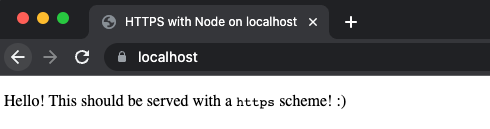
Final thing to do is load your site at https://localhost and you’re done!
One final thing: You can also use port 80 instead of 443. But if you use port 80, you need to load the site at https://localhost:80.
Here’s a demo for you to play with :)
That’s it!