ZL
About Articles Contact
Published on Mar 24, 2021
Filed under:
#devops,
#github actions,
#tooling

How to debug a Github Actions' secret

One irritating thing about Github Actions is you can’t debug secrets. If you try to debug secrets you’ll get *** in the log.

run echo

This makes sense because Github is trying to help us keep the secret secret (ha!). But it doesn’t help when we’re trying to figure out whether there’s something wrong with the secret we provided.

There’s still a way to show this secret if you really want to show it. You can separate the characters with a space using the following code. The secret will now show up.

run: echo ${{secrets.YOUR_SECRET }} | sed 's/./& /g'
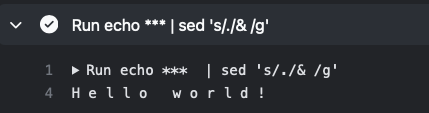
separate characters with a space

That said, make sure you’re testing a fake secret if you use this method, since this secret will get logged into the Github Actions panel for everyone to see.

Previous Year end review — 2021 Next Serving HTTPS locally with Node

Join My Newsletter

I share what I’m learning on this newsletter: code, building businesses, and living well.

Sometimes I write about technical deep-dives, product updates, musings on how to live, and sometimes my struggles and how I’m breaking through.

Regardless of the type of content, I do my best to send you an update every week.

If you’re into making things and growing as a person, you’ll probably feel at home here.

“

Zell is the rare sort of developer who both knows his stuff and can explain even the most technical jargon in approachable — and even fun — ways!

I’ve taken his courses and always look forward to his writing because I know I’ll walk away with something that makes me a better front-ender.

Geoff Graham
Geoff Graham — Chief Editor @ CSS Tricks
The Footer

General

Home About Contact Testimonials Tools I Use

Projects

Magical Dev School Splendid Labz

Socials

Youtube Instagram Tiktok Github Bluesky X

Follow Along

Email RSS
© 2013 - 2025 Zell Liew / All rights reserved / Terms